Sign up to elevate.io, the free online video editor, today and get access to dozens of cool, snappy, dreamy, and funky transitions — perfect for your social media and marketing videos. Let's go through each and every great transition in our collection.
Blotch
The Blotch transition has random areas of clip A disappear to eventually fully reveal clip B. You can customize the randomness, density, and edge blur of the transition to have every appearance be unique.
Blur dissolve
The Blur dissolve transition has a gradual blurry vision transition from clip A to clip B. Perfect for videos with a dreamy or mysterious vibe. You can increase or decrease the strength of the blur.
Circle crop
The Circle crop transition has a circle decrease in size until clip A is completely hidden and the entire frame is a solid color, and the circle then expands again to reveal clip B. You can easily customize the color of the circle crop with a color picker.
Circle open
The Circle open transition has a circle open from the centre of clip A, which reveals clip B. You can easily control the smoothness of the edge from perfectly sharp to very blurry.
Clock wipe
The Clock wipe transition goes from clip A to clip B with a revealing wipe that resembles the movement of the hands of a clock. Control the blur of the wipe with the smoothness slider.
Cube 3D
The Cube 3D transition has a rotating 3D cube go from clip A to clip B. Easily change the perspective and the distance of the cube. Use the reflection slider to decrease or increase the strength of the reflection.
Dip to color
Dip to color is a classic transition that starts with clip A and gradually increases opacity until the frame is a solid color. When the solid color decreases opacity, clip B is revealed. You can choose any color to dip to with a handy color picker.
Directional warp
The Directional warp transition goes from clip A to clip B with a trippy edge warp. Customize the strength and direction of the warp with granular controls.
Directional wipe
The Directional wipe transition starts from clip A and smoothly wipes across the screen to reveal clip B. You can customize the blur and direction of the edge.
Dissolve
Dissolve is the all-time classic transition, perfect for revealing a change of scenery or conveying the passage of time. Clip A gradually fades out until clip B is fully revealed.
Falling bars
Straight out of the classic Doom video game's title screen. Falling bars transition clip A to clip B as vertical bars fall down the screen at different velocities. Easily customize the randomness, number of bars, and the distance between each bar.
Flash zoom
Flash zoom is a dreamy transition that goes from clip A to clip B with a rotating flash. You can also customize the rotation and strength of the flash zoom.
Push
The Push transition has clip B push clip A out of the frame. Easily choose the direction of the push.
Ripple
The Ripple transition makes clip A ripple like water as clip B fades in. Control the ripple frequency and strength of the pulses to customize the look.
Wave
The wave transition adds a funky wave effect as clip A fades out and clip B is revealed. Increase or decrease the strength of the wave with the Amplitude slider.
Zoom across
The Zoom across transition does a side to side zoom into clip A as clip B is revealed. Control the strength of the transition with an easy slider.
Zoom dissolve
The Zoom dissolve transition zooms smoothly into clip A and lands on clip B. Customize the strength of the zoom with the factor slider or reverse the transition to create a zoom out transition.
Get your free transitions today
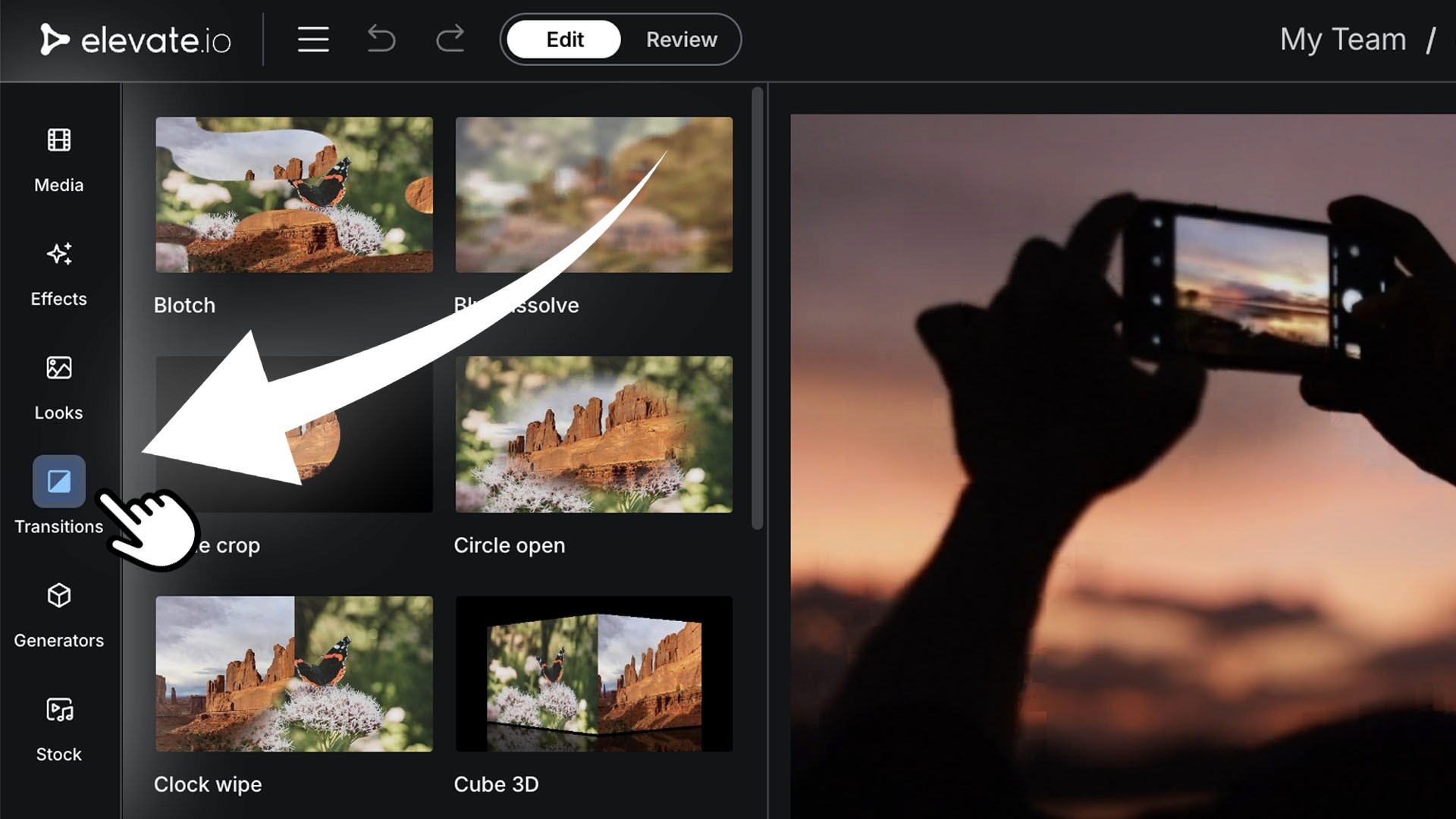
Getting your free transitions collection is easy. Just sign up to elevate.io for free, create a new project, and go to the Transitions tab in the vertical navigation bar to access your transitions.
Sign up to elevate.io, the free online video editor, today and get access to dozens of cool, snappy, dreamy, and funky transitions — perfect for your social media and marketing videos. Let's go through each and every great transition in our collection.
Blotch
The Blotch transition has random areas of clip A disappear to eventually fully reveal clip B. You can customize the randomness, density, and edge blur of the transition to have every appearance be unique.
Blur dissolve
The Blur dissolve transition has a gradual blurry vision transition from clip A to clip B. Perfect for videos with a dreamy or mysterious vibe. You can increase or decrease the strength of the blur.
Circle crop
The Circle crop transition has a circle decrease in size until clip A is completely hidden and the entire frame is a solid color, and the circle then expands again to reveal clip B. You can easily customize the color of the circle crop with a color picker.
Circle open
The Circle open transition has a circle open from the centre of clip A, which reveals clip B. You can easily control the smoothness of the edge from perfectly sharp to very blurry.
Clock wipe
The Clock wipe transition goes from clip A to clip B with a revealing wipe that resembles the movement of the hands of a clock. Control the blur of the wipe with the smoothness slider.
Cube 3D
The Cube 3D transition has a rotating 3D cube go from clip A to clip B. Easily change the perspective and the distance of the cube. Use the reflection slider to decrease or increase the strength of the reflection.
Dip to color
Dip to color is a classic transition that starts with clip A and gradually increases opacity until the frame is a solid color. When the solid color decreases opacity, clip B is revealed. You can choose any color to dip to with a handy color picker.
Directional warp
The Directional warp transition goes from clip A to clip B with a trippy edge warp. Customize the strength and direction of the warp with granular controls.
Directional wipe
The Directional wipe transition starts from clip A and smoothly wipes across the screen to reveal clip B. You can customize the blur and direction of the edge.
Dissolve
Dissolve is the all-time classic transition, perfect for revealing a change of scenery or conveying the passage of time. Clip A gradually fades out until clip B is fully revealed.
Falling bars
Straight out of the classic Doom video game's title screen. Falling bars transition clip A to clip B as vertical bars fall down the screen at different velocities. Easily customize the randomness, number of bars, and the distance between each bar.
Flash zoom
Flash zoom is a dreamy transition that goes from clip A to clip B with a rotating flash. You can also customize the rotation and strength of the flash zoom.
Push
The Push transition has clip B push clip A out of the frame. Easily choose the direction of the push.
Ripple
The Ripple transition makes clip A ripple like water as clip B fades in. Control the ripple frequency and strength of the pulses to customize the look.
Wave
The wave transition adds a funky wave effect as clip A fades out and clip B is revealed. Increase or decrease the strength of the wave with the Amplitude slider.
Zoom across
The Zoom across transition does a side to side zoom into clip A as clip B is revealed. Control the strength of the transition with an easy slider.
Zoom dissolve
The Zoom dissolve transition zooms smoothly into clip A and lands on clip B. Customize the strength of the zoom with the factor slider or reverse the transition to create a zoom out transition.
Get your free transitions today
Getting your free transitions collection is easy. Just sign up to elevate.io for free, create a new project, and go to the Transitions tab in the vertical navigation bar to access your transitions.