How elevate.io Compares to Descript on Price and Features
How elevate.io Compares to Descript on Price and Features
Updated on
Looking for a Descript alternative? Here's how elevate.io compares
Descript is one of the most capable AI-powered editors available. If you edit a lot of talking-head content, podcasts, or interviews, its transcript-based workflow genuinely saves time. But Descript doesn't have a specific Review mode for stakeholders.
Getting sign-off on a cut means exporting it and handling feedback somewhere else (by email, Slack, or a separate review tool) which brings the export-and-reupload cycle back into the picture.
elevate.io edits and gets approval on the same platform. There's no exporting a cut to get a note on it, no re-uploading after every amendment, and no guesswork about which version is the most current.
Try elevate.io free. No download, no credit card required
In this guide:
What Descript is best at
What elevate.io is best at
Where Descript leaves a gap
Comparison table
Pricing comparison
Which one should you choose?
Frequently asked questions
What Descript is best at
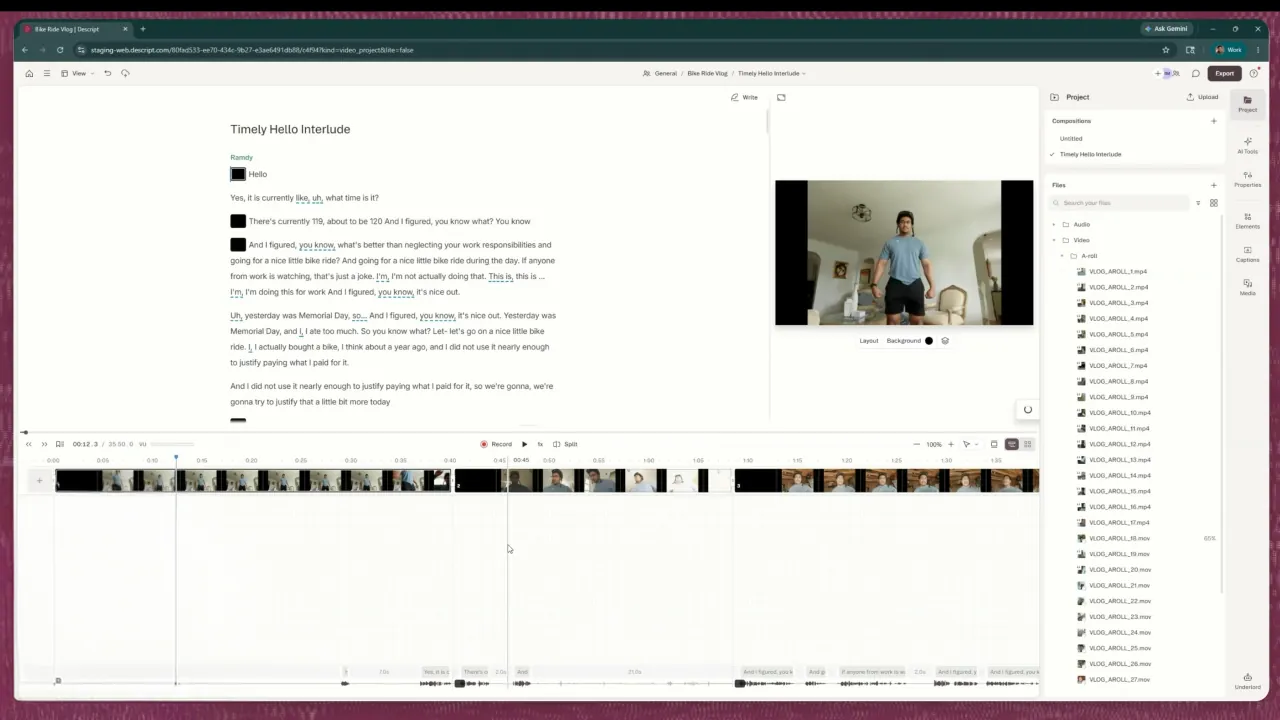
Descript's standout feature is transcript-based editing. Upload or record your video, Descript transcribes the audio, and you edit the video by editing the text. Delete a sentence from the transcript and the corresponding footage disappears from the timeline. For creators who produce a lot of talking-head content (like podcasts, interviews, tutorials, training videos) that's a significantly faster way to work than a traditional timeline editor.
The AI suite goes deep: Studio Sound cleans up audio in one click, Remove Filler Words cuts ums and ahs automatically, Eye Contact correction keeps the speaker looking at the camera even when they weren't and Voice Cloning lets you patch dialogue without a re-record. These used to require a specialist and a separate tool; Descript puts them in one place.
Descript does allow collaborators to comment on the timeline and the transcript, and Basic seats that can view and comment are free.
On the downside: Descript allows collaborators to comment on the timeline and transcript through "can comment" project access, so feedback doesn't have to leave the project. What it doesn't have is a dedicated reviewer window that separates the viewing and commenting experience from the editing environment, or a formal sign-off record.
What elevate.io is best at
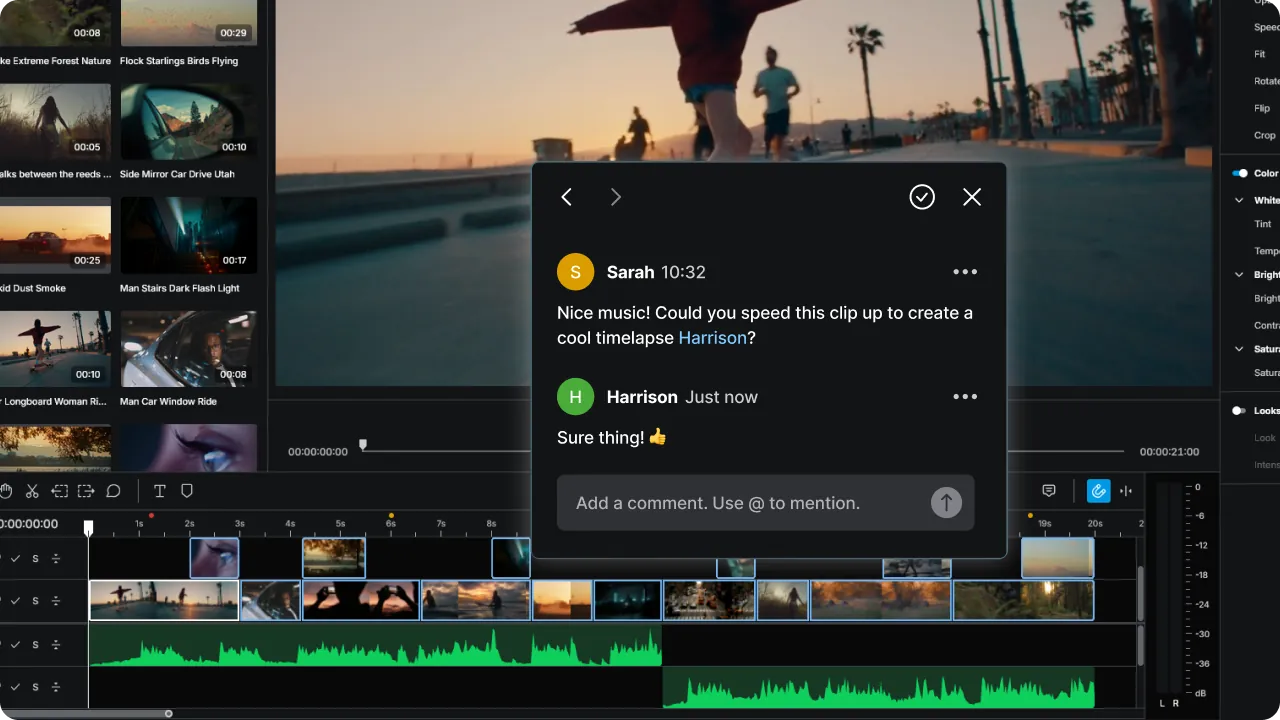
With elevate.io, the edit and the review happen in the same place. There’s no switching between tools, no exporting a cut just to get a note on it.
You edit on a full browser-based timeline: cut, trim, add music, grade, apply effects, and export in 4K. Everything is stored in the cloud, so the whole team can access any project from any device at any time.
When it's time for feedback, nothing moves. Reviewers open the same project, watch the cut in a clean player view, and leave comments pinned to the exact second they're referring to. The editor sees them immediately and actions them on the spot. One link, one version, always current. You export once, when it's done. Anyone who isn’t an editor doesn’t have to deal with the overwhelm of seeing the entire editing suite at once. And those team members that are collaborating can see each other’s cursor move while they are working on the video thanks to real-time collaborative, multi-cursor editing.
What elevate.io doesn't have: voice cloning, transcript-based editing, filler-word removal, or AI multicam. elevate.io has AI text-to-speech narration, auto captions, AI image generation and AI voice isolation for background noise removal. These are practical tools for production speed, but a different scope from what Descript offers for dialogue-heavy content
In other words, Descript is built for creators whose biggest time-saver is editing by transcript. elevate.io is built for teams whose biggest frustration is the handoff between editing and getting a cut approved, or those teams that just want that extra layer of creative freedom.
Where Descript leaves a gap
Both Descript and elevate.io allow collaborators to leave comments within the project without feedback leaving the editor. The difference is in how that review experience is structured.
Descript's "can comment" access puts reviewers inside the editing environment. They see the full project. elevate.io's Review Mode gives external reviewers a dedicated, simplified player view: they watch the cut and leave timestamped comments without seeing or accessing the editing timeline at all.
For teams where reviewers are clients, execs, or external stakeholders who shouldn't be in the editor, that separation can remove a lot of the overwhelm and confusion that comes with seeing the full editing suite at all times.
The other meaningful difference is in co-editing. elevate.io supports multi-cursor real-time editing. Multiple editors working simultaneously with visible cursors. Descript doesn't have multi-cursor editing, so while multiple people can access a project, simultaneous live editing isn't the same experience.
If you’re looking at a downloads folder full of versions, a Slack thread where someone's commenting on the wrong video, and a stakeholder who approved something three versions ago, it’s time to switch to elevate.io.
Feedback comes in on the timeline, right where the edit is happening, and the editor actions it without touching a file transfer. One project, one link, one version and the only export is the finished one.
Capability | Descript | elevate.io |
|---|---|---|
Actually edits video | Yes, transcript-based + AI tools | Yes, browser timeline editor |
Transcript-based editing | Yes, core feature | No |
AI voice cloning | Yes, deep suite | No, AI text-to-speech narration available |
AI filler word removal | Yes | No |
Auto captions | Yes | Yes |
Built-in review workflow | Partial; 'can comment' access exists. No dedicated reviewer window | Yes, inside the editor |
In-project comments | Yes, 'can comment' access; reviewers see the editing environment | Yes, on the editing timeline |
Documented approval record | No | Yes, timestamped comments; no formal lock |
Cloud storage | Yes | Yes |
Royalty-free music and stock library | Yes | Yes |
Real-time multi-cursor editing | No | Yes |
4K export | Yes | Yes, cloud rendered |
Free plan | Yes, limited, watermarked | Yes, no watermark, no time limit |
Pricing, plans, and feature sets change. Confirm current details with each vendor before you commit.
Pricing comparison
Plan | Descript | elevate.io |
|---|---|---|
Free | $0 - ~60 media minutes/month, watermarked exports | Starter: $0 - no watermark, no time limit, 5 GB storage, unlimited reviewers |
Tier 2 | Hobbyist: $16/seat/month (annual) - basic AI tools, 1080p export | Creator: £10/month or £100/year- 250 GB, unlimited 4K exports, unlimited reviewers and 2 editor seats |
Tier 3 | Creator: $24/seat/month (annual) - full AI suite, 4K export | Pro: £30/month or £300/year - 5 seats, 750 GB |
Tier 4 | Business: $50/seat/month (annual) - team Brand Studio | Business: $100/month or £1,000/year - 10 seats, 2.5 TB, premium support |
Enterprise | Custom | - |
Descript is priced per seat, which means a five-person team on the Creator plan pays $120/month. That's before accounting for any separate review tool they still need alongside it.
elevate.io is a flat team rate: editing and review in one subscription, unlimited reviewers on any paid plan, without a per-seat multiplier.
Which one should you choose?
If you produce a lot of talking-head content, podcasts, or interviews and want the deepest AI editing toolkit available, Descript is best. Transcript-based cutting and voice cloning genuinely save time if that's your main output.
elevate.io suits teams who want more creative control than the average template editor gives them. A proper timeline, colour grading, and built-in stock and music in a browser, free to start.
You get the creative range of a proper editor without the learning curve of professional software, and a review workflow where feedback lands in the same place the work is happening.
Frequently asked questions
Does elevate.io replace Descript?
e elevate.io differs in how the review experience is structured. Reviewers get a dedicated player view rather than access to the editing environment, and multiple editors can work simultaneously with live cursors. For teams where the editing-to-approval handoff involves external stakeholders who shouldn't be inside the project, that distinction matters.
Is Descript free to use?
Descript has a free plan that includes around 60 media minutes per month, watermarked exports, and 100 one-time AI credits. It's enough to test the transcript-based editing workflow, but the volume and watermark limits make it unworkable for regular publishing. Paid plans start at $16 per seat per month on annual billing.
Does elevate.io have a free plan?
Yes. The Starter plan includes the full video editor, 5 GB cloud storage, 5 projects, 2 monthly exports at 720p, and unlimited reviewers. No watermark, no time limit.
Is Descript good for marketing teams?
Descript is a strong fit for marketing teams producing a lot of talking-head video like product demos, training clips, interview content. It's faster than a traditional timeline editor for that type of content. The downside is review and approval: getting stakeholder sign-off still requires exporting and handling feedback outside the project.
What's the main difference between Descript and elevate.io?
Descript is built around transcript-based editing and a deep AI suite for spoken-word content. elevate.io is built around the full production cycle, e.g. editing, review, and approval in the same workspace, without the AI depth that Descript offers for dialogue-heavy content. Which one fits depends on where your team's time is going: the edit itself, or the process of getting it approved.
The best tool is the one that gets approval without a file transfer
If the back-and-forth between editing and approval is where your time goes, consider elevate.io.
Everything happens in one place, from the first cut to the final sign-off. Try it free today.
Looking for a Descript alternative? Here's how elevate.io compares
Descript is one of the most capable AI-powered editors available. If you edit a lot of talking-head content, podcasts, or interviews, its transcript-based workflow genuinely saves time. But Descript doesn't have a specific Review mode for stakeholders.
Getting sign-off on a cut means exporting it and handling feedback somewhere else (by email, Slack, or a separate review tool) which brings the export-and-reupload cycle back into the picture.
elevate.io edits and gets approval on the same platform. There's no exporting a cut to get a note on it, no re-uploading after every amendment, and no guesswork about which version is the most current.
Try elevate.io free. No download, no credit card required
In this guide:
What Descript is best at
What elevate.io is best at
Where Descript leaves a gap
Comparison table
Pricing comparison
Which one should you choose?
Frequently asked questions
What Descript is best at
Descript's standout feature is transcript-based editing. Upload or record your video, Descript transcribes the audio, and you edit the video by editing the text. Delete a sentence from the transcript and the corresponding footage disappears from the timeline. For creators who produce a lot of talking-head content (like podcasts, interviews, tutorials, training videos) that's a significantly faster way to work than a traditional timeline editor.
The AI suite goes deep: Studio Sound cleans up audio in one click, Remove Filler Words cuts ums and ahs automatically, Eye Contact correction keeps the speaker looking at the camera even when they weren't and Voice Cloning lets you patch dialogue without a re-record. These used to require a specialist and a separate tool; Descript puts them in one place.
Descript does allow collaborators to comment on the timeline and the transcript, and Basic seats that can view and comment are free.
On the downside: Descript allows collaborators to comment on the timeline and transcript through "can comment" project access, so feedback doesn't have to leave the project. What it doesn't have is a dedicated reviewer window that separates the viewing and commenting experience from the editing environment, or a formal sign-off record.
What elevate.io is best at
With elevate.io, the edit and the review happen in the same place. There’s no switching between tools, no exporting a cut just to get a note on it.
You edit on a full browser-based timeline: cut, trim, add music, grade, apply effects, and export in 4K. Everything is stored in the cloud, so the whole team can access any project from any device at any time.
When it's time for feedback, nothing moves. Reviewers open the same project, watch the cut in a clean player view, and leave comments pinned to the exact second they're referring to. The editor sees them immediately and actions them on the spot. One link, one version, always current. You export once, when it's done. Anyone who isn’t an editor doesn’t have to deal with the overwhelm of seeing the entire editing suite at once. And those team members that are collaborating can see each other’s cursor move while they are working on the video thanks to real-time collaborative, multi-cursor editing.
What elevate.io doesn't have: voice cloning, transcript-based editing, filler-word removal, or AI multicam. elevate.io has AI text-to-speech narration, auto captions, AI image generation and AI voice isolation for background noise removal. These are practical tools for production speed, but a different scope from what Descript offers for dialogue-heavy content
In other words, Descript is built for creators whose biggest time-saver is editing by transcript. elevate.io is built for teams whose biggest frustration is the handoff between editing and getting a cut approved, or those teams that just want that extra layer of creative freedom.
Where Descript leaves a gap
Both Descript and elevate.io allow collaborators to leave comments within the project without feedback leaving the editor. The difference is in how that review experience is structured.
Descript's "can comment" access puts reviewers inside the editing environment. They see the full project. elevate.io's Review Mode gives external reviewers a dedicated, simplified player view: they watch the cut and leave timestamped comments without seeing or accessing the editing timeline at all.
For teams where reviewers are clients, execs, or external stakeholders who shouldn't be in the editor, that separation can remove a lot of the overwhelm and confusion that comes with seeing the full editing suite at all times.
The other meaningful difference is in co-editing. elevate.io supports multi-cursor real-time editing. Multiple editors working simultaneously with visible cursors. Descript doesn't have multi-cursor editing, so while multiple people can access a project, simultaneous live editing isn't the same experience.
If you’re looking at a downloads folder full of versions, a Slack thread where someone's commenting on the wrong video, and a stakeholder who approved something three versions ago, it’s time to switch to elevate.io.
Feedback comes in on the timeline, right where the edit is happening, and the editor actions it without touching a file transfer. One project, one link, one version and the only export is the finished one.
Capability | Descript | elevate.io |
|---|---|---|
Actually edits video | Yes, transcript-based + AI tools | Yes, browser timeline editor |
Transcript-based editing | Yes, core feature | No |
AI voice cloning | Yes, deep suite | No, AI text-to-speech narration available |
AI filler word removal | Yes | No |
Auto captions | Yes | Yes |
Built-in review workflow | Partial; 'can comment' access exists. No dedicated reviewer window | Yes, inside the editor |
In-project comments | Yes, 'can comment' access; reviewers see the editing environment | Yes, on the editing timeline |
Documented approval record | No | Yes, timestamped comments; no formal lock |
Cloud storage | Yes | Yes |
Royalty-free music and stock library | Yes | Yes |
Real-time multi-cursor editing | No | Yes |
4K export | Yes | Yes, cloud rendered |
Free plan | Yes, limited, watermarked | Yes, no watermark, no time limit |
Pricing, plans, and feature sets change. Confirm current details with each vendor before you commit.
Pricing comparison
Plan | Descript | elevate.io |
|---|---|---|
Free | $0 - ~60 media minutes/month, watermarked exports | Starter: $0 - no watermark, no time limit, 5 GB storage, unlimited reviewers |
Tier 2 | Hobbyist: $16/seat/month (annual) - basic AI tools, 1080p export | Creator: £10/month or £100/year- 250 GB, unlimited 4K exports, unlimited reviewers and 2 editor seats |
Tier 3 | Creator: $24/seat/month (annual) - full AI suite, 4K export | Pro: £30/month or £300/year - 5 seats, 750 GB |
Tier 4 | Business: $50/seat/month (annual) - team Brand Studio | Business: $100/month or £1,000/year - 10 seats, 2.5 TB, premium support |
Enterprise | Custom | - |
Descript is priced per seat, which means a five-person team on the Creator plan pays $120/month. That's before accounting for any separate review tool they still need alongside it.
elevate.io is a flat team rate: editing and review in one subscription, unlimited reviewers on any paid plan, without a per-seat multiplier.
Which one should you choose?
If you produce a lot of talking-head content, podcasts, or interviews and want the deepest AI editing toolkit available, Descript is best. Transcript-based cutting and voice cloning genuinely save time if that's your main output.
elevate.io suits teams who want more creative control than the average template editor gives them. A proper timeline, colour grading, and built-in stock and music in a browser, free to start.
You get the creative range of a proper editor without the learning curve of professional software, and a review workflow where feedback lands in the same place the work is happening.
Frequently asked questions
Does elevate.io replace Descript?
e elevate.io differs in how the review experience is structured. Reviewers get a dedicated player view rather than access to the editing environment, and multiple editors can work simultaneously with live cursors. For teams where the editing-to-approval handoff involves external stakeholders who shouldn't be inside the project, that distinction matters.
Is Descript free to use?
Descript has a free plan that includes around 60 media minutes per month, watermarked exports, and 100 one-time AI credits. It's enough to test the transcript-based editing workflow, but the volume and watermark limits make it unworkable for regular publishing. Paid plans start at $16 per seat per month on annual billing.
Does elevate.io have a free plan?
Yes. The Starter plan includes the full video editor, 5 GB cloud storage, 5 projects, 2 monthly exports at 720p, and unlimited reviewers. No watermark, no time limit.
Is Descript good for marketing teams?
Descript is a strong fit for marketing teams producing a lot of talking-head video like product demos, training clips, interview content. It's faster than a traditional timeline editor for that type of content. The downside is review and approval: getting stakeholder sign-off still requires exporting and handling feedback outside the project.
What's the main difference between Descript and elevate.io?
Descript is built around transcript-based editing and a deep AI suite for spoken-word content. elevate.io is built around the full production cycle, e.g. editing, review, and approval in the same workspace, without the AI depth that Descript offers for dialogue-heavy content. Which one fits depends on where your team's time is going: the edit itself, or the process of getting it approved.
The best tool is the one that gets approval without a file transfer
If the back-and-forth between editing and approval is where your time goes, consider elevate.io.
Everything happens in one place, from the first cut to the final sign-off. Try it free today.