PlayPause vs elevate.io: Here’s how they compare
PlayPause vs elevate.io: Here’s how they compare
Updated on
If your team is using PlayPause, you already know what it does well. Comments that you can leave down to the frame you’re referring to, version stacks, approval locks, and a documented sign-off record. It’s a great video tool, but it doesn’t create or edit video. That still happens somewhere else…which means a separate tool, a separate subscription, and an export to somewhere else every single time the edit changes.
elevate.io puts the edit and the review in the same project. Timestamped comments land directly on the editing timeline, the final export is the only export, and your team is always working from the same version. Here's how they compare.
Try elevate.io free! No download, no editing experience required
In this guide:
What PlayPause is best at
What elevate.io is best at
Where PlayPause leaves a gap
Comparison table
Pricing comparison
Which one should you choose?
Frequently asked questions
What PlayPause is best at
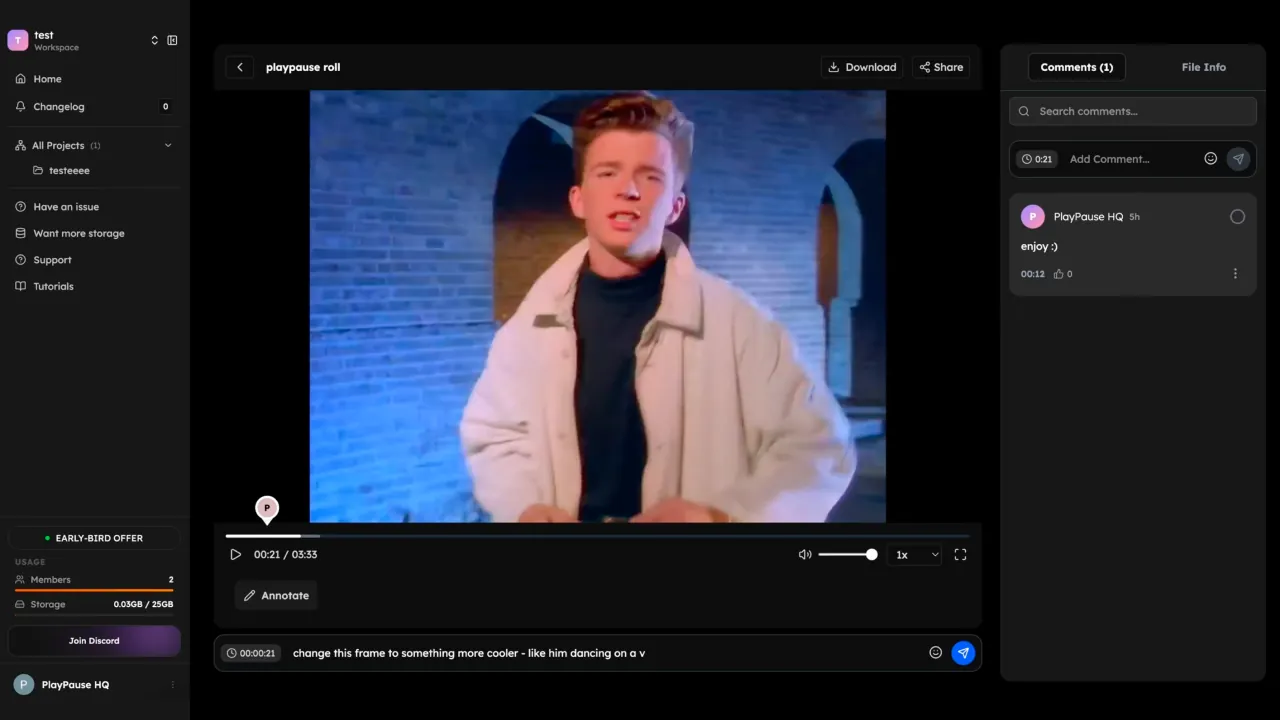
PlayPause is a video review and approval platform. Reviewers can pin feedback to the exact frame they mean, draw directly on the image, and stack versions side by side to compare cuts. When a stakeholder hits approve, the decision is logged with a timestamp and the version is locked. That documented record is PlayPause's strongest feature, because there's a clear trail of what was approved and when.
Integrations with Adobe Premiere and After Effects let editors resolve comments without leaving their editing software, and Camera-to-Cloud moves footage into the review space straight from the shoot. Secure sharing (e.g. passwords, expiring links, watermarking) covers situations where a rough cut needs to be shared externally without the risk of it going further than intended.
PlayPause charges by storage rather than headcount, so reviewers join free regardless of how many stakeholders are in the loop.
It’s a great review tool but there’s a gap: PlayPause doesn't edit video. Every version that arrives in PlayPause has been exported from a different tool, and after notes are actioned, the updated version has to be re-uploaded for the next round…leaving room for error.
What elevate.io is best at
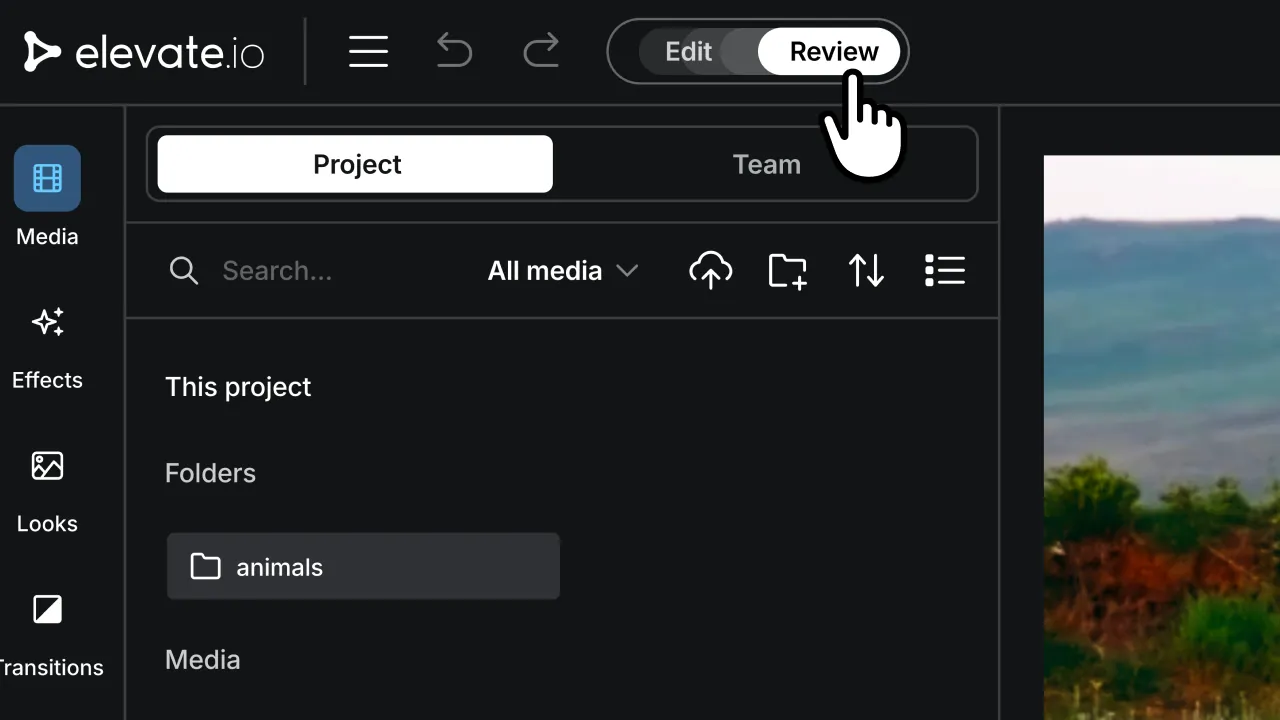
elevate.io is a video editor and a review tool in one.
The editing side covers what most teams need: cut, trim, color grading, transitions, effects, 4K cloud exports, royalty-free music and stock footage built in, and all your projects stored in the cloud so the whole team always has access.
The review side lives inside the same workspace. Collaborators leave timestamped comments directly on the editing timeline (attached to the exact second they mean) and the editor can action them immediately without exporting anything.
External stakeholders get a clean video to watch and comment without accessing the editor. The project lives under one permanent URL throughout, so everyone is always looking at the same version automatically. The final export is the only export.
Where elevate.io differs from PlayPause: there's no formal documented approval lock. elevate.io's review workflow is built around timestamped comments and @mentions. If that is a hard requirement for your team, PlayPause is still the right tool for that specifically.
For teams whose bigger problem is the export-and-reupload cycle between editing and review, elevate.io removes it.
Where PlayPause leaves a gap
The problem is the loop. Every time the edit changes, the cycle starts again: export the cut, upload it to PlayPause, wait for feedback, go back into the editor, make the changes, export again, re-upload. The file ends up named something like campaign_v8_FINAL_amends.mp4 (and nobody's quite sure if it's the one that was approved).
That loop is where versions get confused and feedback gets lost. It's not a PlayPause problem; it's what happens when the review lives in a different place from the edit.
With elevate.io, feedback lands on the timeline the moment someone leaves it. The editor can take action immediately, in the same workspace, without a file transfer in between. There's no version to chase because there's never more than one version.
Capability comparison
Capability | PlayPause | elevate.io |
Actually edits video | No | Yes |
Timestamped comments | Yes, frame-accurate | Yes, on the editing timeline |
Approval record | Yes, core feature | Yes, timestamped comments; no formal approval lock |
Built-in review workflow | Yes | Yes, inside the editor |
Cloud storage | N/A | Yes |
Royalty-free music and stock library | N/A | Yes |
AI tools (captions, voiceover, image generation) | No | Yes |
Adobe Premiere / After Effects integration | Yes | No |
Camera-to-Cloud | Yes | No |
Secure sharing (passwords, watermarking) | Yes | Review Mode with shareable link |
Free plan | Yes, reviewers always free | Yes, no watermark, no time limit |
Pricing, plans, and feature sets change; confirm current details with each vendor before you commit.
Pricing comparison
Plan | PlayPause | elevate.io |
Free | $0 — reviewers always free | Starter: $0 — no watermark, no time limit, 5 GB storage, unlimited reviewers |
Tier 2 | Starter: $3/month — storage-based | Creator: $10/month flat — 250 GB, unlimited 4K exports, unlimited reviewers |
Tier 3 | Creator: $5/month | Pro: $30/month flat — 5 seats, 750 GB |
Tier 4 | Agency: $7/month | Business: $100/month flat — 10 seats, 2.5 TB |
Enterprise | $25/month | — |
PlayPause is priced by storage, which means reviewers join free at any tier. elevate.io is a flat team rate: editing and review included, unlimited reviewers on any paid plan, with no per-seat multiplier.
PlayPause at any tier still requires a separate editor alongside it. elevate.io's Creator plan at $10/month covers editing, review, and storage in one subscription.
Which one should you choose?
If a formal, documented, timestamped approval record is your main requirement, particularly if you need it to hold up in a dispute, or if you're already working inside Adobe workflows and need Premiere or After Effects integration, PlayPause is the right tool for that.
If your biggest frustration is the export cycle between editing and review, choose elevate.io. The edit and the feedback happen in the same workspace, your team always works from the same version, and you'll go from footage to final without leaving the tab.
Frequently asked questions
Does elevate.io replace PlayPause?
For most teams, yes. The review is built into the editor, so there's no separate approval platform to manage. However, PlayPause produces a formal documented sign-off lock; elevate.io uses timestamped comments without one. If that specific feature is a requirement, PlayPause is still the right tool for it.
Is PlayPause free to use?
PlayPause has a free tier, and reviewers join free at every plan. Paid plans start at $3/month, priced by storage rather than headcount.
Does elevate.io have a free plan?
Yes. The Starter plan includes the full video editor, 5 GB cloud storage, 5 projects, 2 monthly exports at 720p, and unlimited reviewers. No watermark, no time limit.
Can I use PlayPause with my existing editing software?
Yes. PlayPause integrates with Adobe Premiere and After Effects, and supports Camera-to-Cloud for footage ingestion. It's designed to sit alongside an existing editor rather than replace it.
What's the difference between PlayPause and elevate.io for teams?
PlayPause handles review and approval; your team still needs a separate editor. elevate.io handles both in the same workspace, so there's no exporting between tools or re-uploading after every amend. PlayPause has a stronger formal approval record; elevate.io has a stronger end-to-end workflow.
The best tool is the one that gets a video edit approved without a file transfer
If moving between your editor and your review tool is costing your team time, elevate.io removes that step entirely.
Create. Review. Publish. No exporting required. Try it free and get your next video approved without leaving the project.
If your team is using PlayPause, you already know what it does well. Comments that you can leave down to the frame you’re referring to, version stacks, approval locks, and a documented sign-off record. It’s a great video tool, but it doesn’t create or edit video. That still happens somewhere else…which means a separate tool, a separate subscription, and an export to somewhere else every single time the edit changes.
elevate.io puts the edit and the review in the same project. Timestamped comments land directly on the editing timeline, the final export is the only export, and your team is always working from the same version. Here's how they compare.
Try elevate.io free! No download, no editing experience required
In this guide:
What PlayPause is best at
What elevate.io is best at
Where PlayPause leaves a gap
Comparison table
Pricing comparison
Which one should you choose?
Frequently asked questions
What PlayPause is best at
PlayPause is a video review and approval platform. Reviewers can pin feedback to the exact frame they mean, draw directly on the image, and stack versions side by side to compare cuts. When a stakeholder hits approve, the decision is logged with a timestamp and the version is locked. That documented record is PlayPause's strongest feature, because there's a clear trail of what was approved and when.
Integrations with Adobe Premiere and After Effects let editors resolve comments without leaving their editing software, and Camera-to-Cloud moves footage into the review space straight from the shoot. Secure sharing (e.g. passwords, expiring links, watermarking) covers situations where a rough cut needs to be shared externally without the risk of it going further than intended.
PlayPause charges by storage rather than headcount, so reviewers join free regardless of how many stakeholders are in the loop.
It’s a great review tool but there’s a gap: PlayPause doesn't edit video. Every version that arrives in PlayPause has been exported from a different tool, and after notes are actioned, the updated version has to be re-uploaded for the next round…leaving room for error.
What elevate.io is best at
elevate.io is a video editor and a review tool in one.
The editing side covers what most teams need: cut, trim, color grading, transitions, effects, 4K cloud exports, royalty-free music and stock footage built in, and all your projects stored in the cloud so the whole team always has access.
The review side lives inside the same workspace. Collaborators leave timestamped comments directly on the editing timeline (attached to the exact second they mean) and the editor can action them immediately without exporting anything.
External stakeholders get a clean video to watch and comment without accessing the editor. The project lives under one permanent URL throughout, so everyone is always looking at the same version automatically. The final export is the only export.
Where elevate.io differs from PlayPause: there's no formal documented approval lock. elevate.io's review workflow is built around timestamped comments and @mentions. If that is a hard requirement for your team, PlayPause is still the right tool for that specifically.
For teams whose bigger problem is the export-and-reupload cycle between editing and review, elevate.io removes it.
Where PlayPause leaves a gap
The problem is the loop. Every time the edit changes, the cycle starts again: export the cut, upload it to PlayPause, wait for feedback, go back into the editor, make the changes, export again, re-upload. The file ends up named something like campaign_v8_FINAL_amends.mp4 (and nobody's quite sure if it's the one that was approved).
That loop is where versions get confused and feedback gets lost. It's not a PlayPause problem; it's what happens when the review lives in a different place from the edit.
With elevate.io, feedback lands on the timeline the moment someone leaves it. The editor can take action immediately, in the same workspace, without a file transfer in between. There's no version to chase because there's never more than one version.
Capability comparison
Capability | PlayPause | elevate.io |
Actually edits video | No | Yes |
Timestamped comments | Yes, frame-accurate | Yes, on the editing timeline |
Approval record | Yes, core feature | Yes, timestamped comments; no formal approval lock |
Built-in review workflow | Yes | Yes, inside the editor |
Cloud storage | N/A | Yes |
Royalty-free music and stock library | N/A | Yes |
AI tools (captions, voiceover, image generation) | No | Yes |
Adobe Premiere / After Effects integration | Yes | No |
Camera-to-Cloud | Yes | No |
Secure sharing (passwords, watermarking) | Yes | Review Mode with shareable link |
Free plan | Yes, reviewers always free | Yes, no watermark, no time limit |
Pricing, plans, and feature sets change; confirm current details with each vendor before you commit.
Pricing comparison
Plan | PlayPause | elevate.io |
Free | $0 — reviewers always free | Starter: $0 — no watermark, no time limit, 5 GB storage, unlimited reviewers |
Tier 2 | Starter: $3/month — storage-based | Creator: $10/month flat — 250 GB, unlimited 4K exports, unlimited reviewers |
Tier 3 | Creator: $5/month | Pro: $30/month flat — 5 seats, 750 GB |
Tier 4 | Agency: $7/month | Business: $100/month flat — 10 seats, 2.5 TB |
Enterprise | $25/month | — |
PlayPause is priced by storage, which means reviewers join free at any tier. elevate.io is a flat team rate: editing and review included, unlimited reviewers on any paid plan, with no per-seat multiplier.
PlayPause at any tier still requires a separate editor alongside it. elevate.io's Creator plan at $10/month covers editing, review, and storage in one subscription.
Which one should you choose?
If a formal, documented, timestamped approval record is your main requirement, particularly if you need it to hold up in a dispute, or if you're already working inside Adobe workflows and need Premiere or After Effects integration, PlayPause is the right tool for that.
If your biggest frustration is the export cycle between editing and review, choose elevate.io. The edit and the feedback happen in the same workspace, your team always works from the same version, and you'll go from footage to final without leaving the tab.
Frequently asked questions
Does elevate.io replace PlayPause?
For most teams, yes. The review is built into the editor, so there's no separate approval platform to manage. However, PlayPause produces a formal documented sign-off lock; elevate.io uses timestamped comments without one. If that specific feature is a requirement, PlayPause is still the right tool for it.
Is PlayPause free to use?
PlayPause has a free tier, and reviewers join free at every plan. Paid plans start at $3/month, priced by storage rather than headcount.
Does elevate.io have a free plan?
Yes. The Starter plan includes the full video editor, 5 GB cloud storage, 5 projects, 2 monthly exports at 720p, and unlimited reviewers. No watermark, no time limit.
Can I use PlayPause with my existing editing software?
Yes. PlayPause integrates with Adobe Premiere and After Effects, and supports Camera-to-Cloud for footage ingestion. It's designed to sit alongside an existing editor rather than replace it.
What's the difference between PlayPause and elevate.io for teams?
PlayPause handles review and approval; your team still needs a separate editor. elevate.io handles both in the same workspace, so there's no exporting between tools or re-uploading after every amend. PlayPause has a stronger formal approval record; elevate.io has a stronger end-to-end workflow.
The best tool is the one that gets a video edit approved without a file transfer
If moving between your editor and your review tool is costing your team time, elevate.io removes that step entirely.
Create. Review. Publish. No exporting required. Try it free and get your next video approved without leaving the project.