Comparing elevate.io vs. CapCut in 2026
Comparing elevate.io vs. CapCut in 2026
Updated on
Comparing elevate.io vs. CapCut: Which is best for your team?
If you’re looking for an online video editor, you’re probably already aware of CapCut. CapCut is one of the most popular solutions, with over 500 million monthly users and a very robust free plan. You may also be wondering if there is an alternative out there that offers the same (or even more) features.
CapCut and elevate.io solve the same first problem: getting a video edited quickly, in the browser, for free. Where they differ is what comes after the edit: getting it reviewed, approved, and signed off before it goes live.
Both elevate.io and CapCut are free to start, work in the browser, and offer AI-powered editing tools.
CapCut is geared toward fast, mobile-first social media content, while elevate.io focuses on a complete browser-based edit-to-approval workflow for teams. This post compares both directly so you can judge what fits your situation.
Try elevate.io. No download, and no credit card required.
What CapCut offers
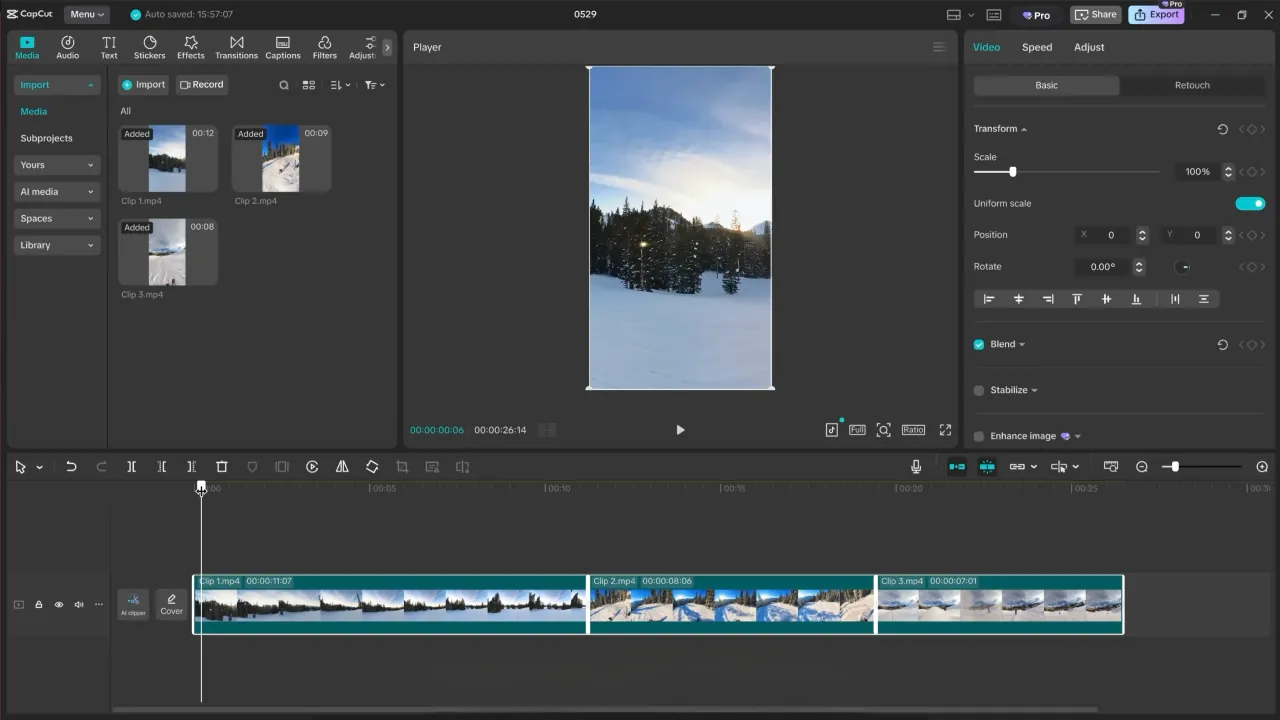
CapCut's free plan gives access to cut and split, multi-track timeline editing, keyframe animation, chroma key, and basic stabilization, plus auto-captions, filters, effects, and an AI text-to-speech tool. Its template library is one of the strongest available for short-form social content, with thousands of platform-ready layouts for TikTok, Reels, and Instagram.
On the AI side, CapCut includes background removal, image and video enhancement, auto-subtitles, text-to-speech, noise removal, and AI video and image generation. Most of the features are accessible on the free plan, with usage limits on some tools.
CapCut Space lets teams create a shared workspace, invite members, access projects from any device, and share drafts for collaborative editing. Teams can assign Admin and Member roles to control who can upload, edit, or delete assets.
Timestamped, frame-specific comments are supported, and the review flow suits marketing and creator teams.
What elevate.io offers

elevate.io is a browser-based video editor built around a full editing timeline: cut, trim, color grading, LUTs, transitions, visual effects, transforms, speed controls, and 4K cloud exports that render without tying up your machine.
Epidemic Sound's royalty-free catalogue and free stock video and image assets are built directly into the editor, so you don't need a separate subscription to source music or footage.
The collaborative editing and review workflow sits inside the same project. Team members edit together in real time. Review Mode gives external stakeholders or clients a clean player view to watch and leave comments without accessing the editor itself. Comments are timestamped to the editing timeline, and editors can action feedback immediately, in the same workspace, without exporting anything between rounds.
However, unlike CapCut, elevate.io states that it does not use customer footage to train AI models; a policy it publishes publicly. CapCut’s Terms of Service and privacy policy disclose that CapCut can use user content, including audio and voice recordings, for various purposes, including commercial use, such as advertising and promotional material. This license is perpetual, meaning CapCut retains these rights even if the user deletes their content or closes their account, with no opt-out mechanism, which is a growing concern for creative agencies.
How collaboration and approval compare
Both platforms allow multiple editors to work on shared projects with role based access controls. CapCut, however, allows one person to edit a video at a time. While one member has editing permission, all other members are restricted to "View only" mode to prevent conflicting changes."
elevate.io's Review Mode separates editor and reviewer access within the same project. Editors work on the timeline; reviewers watch and comment in a clean player without touching the edit.
Like CapCut, comments are timestamped to the timeline, and the project lives under one permanent URL so all stakeholders are always on the same version. Roles cover Editor and Reviewer access rather than a formal multi-tier sign-off system.
Capability comparison
Capability | CapCut | elevate.io |
Actually edits video | Yes | Yes |
Reliability | App/online and desktop tool | Focuses on online video editing, much more responsive and less prone to lag |
Real-time multi-person editing | Yes (CapCut Space) | Yes |
In-app comments | Yes, timestamped, frame-specific | Yes, timestamped, frame-specific |
Role-based access control | Yes, Admin/Member roles | Yes, Editor/Reviewer roles as well as project only editor or full team editor |
Text-to-speech | Yes | Yes |
Template library (social-ready) | Yes, large, platform-specific library | No |
Royalty-free music and stock library | Yes, background tracks, sound effects, video clips, images | Yes, Epidemic Sound + free stock footage |
States no AI training on user footage | No | Yes |
Free plan | Yes | Yes |
Pricing, plans, and feature sets change. Confirm current details on each vendor's website before committing.
Try elevate.io for free. See full feature list at elevate.io/pricing.
Pricing comparison
Plan | CapCut | elevate.io |
Free | £0 - full editor, 1080p export, basic AI tools, no credit card required | Starter: £0 - no watermark, no time limit, unlimited reviewers |
Tier 2 | Standard: ~£9.99/month - watermark-free exports, designed for mobile users | Creator: £10/month or £100/year- 250 GB, unlimited 4K exports, unlimited reviewers and 2 editor seats |
Tier 3 | Pro: ~£19.99/month or ~$179.99/year - full AI toolkit, 4K export, ~1 TB cloud | Pro: £30/month or £300/year - 5 seats, 750 GB |
Tier 4 | Team: from ~£24.99/seat/month - shared workspace, team roles, shared storage | Business: $100/month or £1,000/year - 10 seats, 2.5 TB, premium support |
CapCut does not publish a universal price list. Figures above are USD web checkout estimates based on third-party reporting and are not official CapCut prices. Actual price will vary by region, device (mobile in-app purchases typically cost more than web checkout), account status, and active promotions. Always confirm the current price on CapCut's own upgrade screen before subscribing. elevate.io pricing is a flat team rate with no per-seat multiplier on paid plans.
Who each fits
CapCut suits teams producing high volumes of short-form social content who want an extensive template library and a broad AI toolkit built in. Its free plan is one of the most capable available, and its social-format-ready templates reduce setup time for creators who regularly repeat similar content. It's a strong fit for teams whose primary output is TikTok, Reels, or Instagram-format video.
elevate.io suits teams who want a browser-based timeline editor with color grading, built-in music and stock assets, and an integrated review workflow. Speed is still the point: elevate is built to keep up with the fast-turnaround video marketing demands; it just does it with more editing depth than a tool like CapCut. That same care shows up in the interface, elevate's UI consistently reads as more professional and polished than competitors'. It's a closer fit for teams who need external stakeholders to review and approve video before it publishes without exporting files between tools or managing feedback across email threads.
Frequently asked questions
What is the main difference between CapCut and elevate.io?
CapCut is built around a large template library and a broad AI toolkit, making it well suited to high-volume short-form social content. elevate.io is built around a traditional timeline editor with color grading and an integrated review workflow, making it better suited to teams who need to take a project from edit to stakeholder approval in one place. Both are free to start and both support team collaboration.
Does CapCut have team review and approval?
CapCut Space allows teams to share drafts and share finished videos for review and feedback. Timestamped comments are supported, and the review flow suits marketing and creator teams.
The workflow is closer to collaborative commenting than a structured approval system with documented sign-off.
Does elevate.io have team review and approval?
Yes. elevate.io's Review Mode gives editors and external reviewers separate access to the same project. Reviewers watch in a clean player and leave timestamped comments on the editing timeline without accessing the editor. The project lives under one permanent URL, so all stakeholders are always on the same version. Editors action feedback in the same workspace without exporting anything between rounds.
Is CapCut safe to use?
Not when it comes to your data. CapCut's terms grant ByteDance a perpetual, sublicensable license to use anything you upload or sync, including your face and voice, for AI model training, and there's no way to opt out while still using its cloud features.
Does elevate.io have a free plan?
Yes. The Starter plan includes the full video editor, 5 GB cloud storage, 5 projects, 2 monthly exports at 720p, and unlimited reviewers. There is no watermark on exports and no time limit on the free plan.
Explore both and decide
CapCut and elevate.io overlap in several areas, and differ in ways that depend heavily on your team's actual workflow. The best way to judge the fit is to use both. Both have free plans that require no credit card. For teams who want to go deeper on the elevate.io side, the pricing page has a full breakdown of what each plan includes.
Comparing elevate.io vs. CapCut: Which is best for your team?
If you’re looking for an online video editor, you’re probably already aware of CapCut. CapCut is one of the most popular solutions, with over 500 million monthly users and a very robust free plan. You may also be wondering if there is an alternative out there that offers the same (or even more) features.
CapCut and elevate.io solve the same first problem: getting a video edited quickly, in the browser, for free. Where they differ is what comes after the edit: getting it reviewed, approved, and signed off before it goes live.
Both elevate.io and CapCut are free to start, work in the browser, and offer AI-powered editing tools.
CapCut is geared toward fast, mobile-first social media content, while elevate.io focuses on a complete browser-based edit-to-approval workflow for teams. This post compares both directly so you can judge what fits your situation.
Try elevate.io. No download, and no credit card required.
What CapCut offers
CapCut's free plan gives access to cut and split, multi-track timeline editing, keyframe animation, chroma key, and basic stabilization, plus auto-captions, filters, effects, and an AI text-to-speech tool. Its template library is one of the strongest available for short-form social content, with thousands of platform-ready layouts for TikTok, Reels, and Instagram.
On the AI side, CapCut includes background removal, image and video enhancement, auto-subtitles, text-to-speech, noise removal, and AI video and image generation. Most of the features are accessible on the free plan, with usage limits on some tools.
CapCut Space lets teams create a shared workspace, invite members, access projects from any device, and share drafts for collaborative editing. Teams can assign Admin and Member roles to control who can upload, edit, or delete assets.
Timestamped, frame-specific comments are supported, and the review flow suits marketing and creator teams.
What elevate.io offers
elevate.io is a browser-based video editor built around a full editing timeline: cut, trim, color grading, LUTs, transitions, visual effects, transforms, speed controls, and 4K cloud exports that render without tying up your machine.
Epidemic Sound's royalty-free catalogue and free stock video and image assets are built directly into the editor, so you don't need a separate subscription to source music or footage.
The collaborative editing and review workflow sits inside the same project. Team members edit together in real time. Review Mode gives external stakeholders or clients a clean player view to watch and leave comments without accessing the editor itself. Comments are timestamped to the editing timeline, and editors can action feedback immediately, in the same workspace, without exporting anything between rounds.
However, unlike CapCut, elevate.io states that it does not use customer footage to train AI models; a policy it publishes publicly. CapCut’s Terms of Service and privacy policy disclose that CapCut can use user content, including audio and voice recordings, for various purposes, including commercial use, such as advertising and promotional material. This license is perpetual, meaning CapCut retains these rights even if the user deletes their content or closes their account, with no opt-out mechanism, which is a growing concern for creative agencies.
How collaboration and approval compare
Both platforms allow multiple editors to work on shared projects with role based access controls. CapCut, however, allows one person to edit a video at a time. While one member has editing permission, all other members are restricted to "View only" mode to prevent conflicting changes."
elevate.io's Review Mode separates editor and reviewer access within the same project. Editors work on the timeline; reviewers watch and comment in a clean player without touching the edit.
Like CapCut, comments are timestamped to the timeline, and the project lives under one permanent URL so all stakeholders are always on the same version. Roles cover Editor and Reviewer access rather than a formal multi-tier sign-off system.
Capability comparison
Capability | CapCut | elevate.io |
Actually edits video | Yes | Yes |
Reliability | App/online and desktop tool | Focuses on online video editing, much more responsive and less prone to lag |
Real-time multi-person editing | Yes (CapCut Space) | Yes |
In-app comments | Yes, timestamped, frame-specific | Yes, timestamped, frame-specific |
Role-based access control | Yes, Admin/Member roles | Yes, Editor/Reviewer roles as well as project only editor or full team editor |
Text-to-speech | Yes | Yes |
Template library (social-ready) | Yes, large, platform-specific library | No |
Royalty-free music and stock library | Yes, background tracks, sound effects, video clips, images | Yes, Epidemic Sound + free stock footage |
States no AI training on user footage | No | Yes |
Free plan | Yes | Yes |
Pricing, plans, and feature sets change. Confirm current details on each vendor's website before committing.
Try elevate.io for free. See full feature list at elevate.io/pricing.
Pricing comparison
Plan | CapCut | elevate.io |
Free | £0 - full editor, 1080p export, basic AI tools, no credit card required | Starter: £0 - no watermark, no time limit, unlimited reviewers |
Tier 2 | Standard: ~£9.99/month - watermark-free exports, designed for mobile users | Creator: £10/month or £100/year- 250 GB, unlimited 4K exports, unlimited reviewers and 2 editor seats |
Tier 3 | Pro: ~£19.99/month or ~$179.99/year - full AI toolkit, 4K export, ~1 TB cloud | Pro: £30/month or £300/year - 5 seats, 750 GB |
Tier 4 | Team: from ~£24.99/seat/month - shared workspace, team roles, shared storage | Business: $100/month or £1,000/year - 10 seats, 2.5 TB, premium support |
CapCut does not publish a universal price list. Figures above are USD web checkout estimates based on third-party reporting and are not official CapCut prices. Actual price will vary by region, device (mobile in-app purchases typically cost more than web checkout), account status, and active promotions. Always confirm the current price on CapCut's own upgrade screen before subscribing. elevate.io pricing is a flat team rate with no per-seat multiplier on paid plans.
Who each fits
CapCut suits teams producing high volumes of short-form social content who want an extensive template library and a broad AI toolkit built in. Its free plan is one of the most capable available, and its social-format-ready templates reduce setup time for creators who regularly repeat similar content. It's a strong fit for teams whose primary output is TikTok, Reels, or Instagram-format video.
elevate.io suits teams who want a browser-based timeline editor with color grading, built-in music and stock assets, and an integrated review workflow. Speed is still the point: elevate is built to keep up with the fast-turnaround video marketing demands; it just does it with more editing depth than a tool like CapCut. That same care shows up in the interface, elevate's UI consistently reads as more professional and polished than competitors'. It's a closer fit for teams who need external stakeholders to review and approve video before it publishes without exporting files between tools or managing feedback across email threads.
Frequently asked questions
What is the main difference between CapCut and elevate.io?
CapCut is built around a large template library and a broad AI toolkit, making it well suited to high-volume short-form social content. elevate.io is built around a traditional timeline editor with color grading and an integrated review workflow, making it better suited to teams who need to take a project from edit to stakeholder approval in one place. Both are free to start and both support team collaboration.
Does CapCut have team review and approval?
CapCut Space allows teams to share drafts and share finished videos for review and feedback. Timestamped comments are supported, and the review flow suits marketing and creator teams.
The workflow is closer to collaborative commenting than a structured approval system with documented sign-off.
Does elevate.io have team review and approval?
Yes. elevate.io's Review Mode gives editors and external reviewers separate access to the same project. Reviewers watch in a clean player and leave timestamped comments on the editing timeline without accessing the editor. The project lives under one permanent URL, so all stakeholders are always on the same version. Editors action feedback in the same workspace without exporting anything between rounds.
Is CapCut safe to use?
Not when it comes to your data. CapCut's terms grant ByteDance a perpetual, sublicensable license to use anything you upload or sync, including your face and voice, for AI model training, and there's no way to opt out while still using its cloud features.
Does elevate.io have a free plan?
Yes. The Starter plan includes the full video editor, 5 GB cloud storage, 5 projects, 2 monthly exports at 720p, and unlimited reviewers. There is no watermark on exports and no time limit on the free plan.
Explore both and decide
CapCut and elevate.io overlap in several areas, and differ in ways that depend heavily on your team's actual workflow. The best way to judge the fit is to use both. Both have free plans that require no credit card. For teams who want to go deeper on the elevate.io side, the pricing page has a full breakdown of what each plan includes.