Best video feedback software for client review and approval
Best video feedback software for client review and approval
Updated on
Getting feedback on a video should be straightforward. Is it ever though? Your client sends feedback on an email thread, your colleague pings you in Slack, and someone else comments on an export link. Soon, there’s a back-and-forth, and multiple revision rounds. By the end, you’re not even entirely sure which version of the file your client is looking at.
Video feedback software exists to fix that. This guide covers what it does, what separates good tools from poor ones, and provides a comparison of the options worth considering.
What is video feedback software?
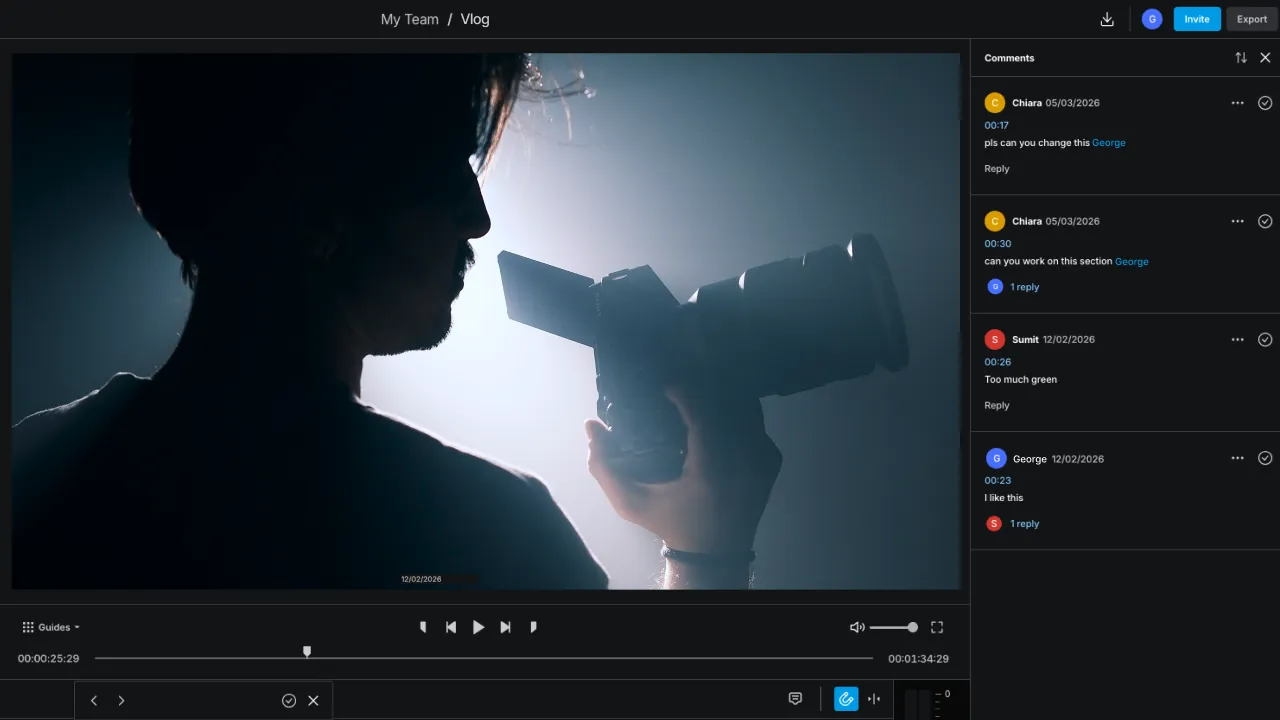
Video feedback software gives clients and stakeholders a dedicated place to watch a video and leave comments, without the feedback ending up scattered across email and chat threads.
Good tools attach comments to a specific timestamp in the video, so the editor knows exactly what moment is being discussed. The best tools go a step further: they keep all reviewers looking at the same version, track which feedback has been actioned, and let editors respond without exporting or re-uploading anything between rounds. (See how elevate handles this).
Video approval software refers to tools in the same category, but with an emphasis on documenting sign-off: who approved, on which version, and when.
What to look for
Before evaluating specific products, it's worth knowing which features actually matter:
Timestamped comments. A comment that says "the music is too loud" is hard to action, but a comment pinned to 0:23 on the timeline is not. Timestamped, frame-specific comments are the baseline.
Version control. Teams producing multiple rounds of revisions need to know which version each piece of feedback refers to. Good tools track versions automatically so you don’t end up with files named v1_final_v2_FINAL_CLIENT.
No re-uploading between rounds. The biggest time sink in most video review workflows is the loop that happens when you’re exporting a new cut, uploading it to a review link, and sending the link again. The best tools eliminate this because the editor updates the file and the reviewers see the latest version at the same URL.
Approval tracking. Some teams need documented proof that a video was reviewed and signed off before it went live, especially in regulated industries, agency workflows with formal deliverables, and any team that's ever had a client dispute whether they approved something.
Best video feedback software
elevate.io
Who it's for: marketing teams that want editing and review in the same workspace, without switching tools between rounds.
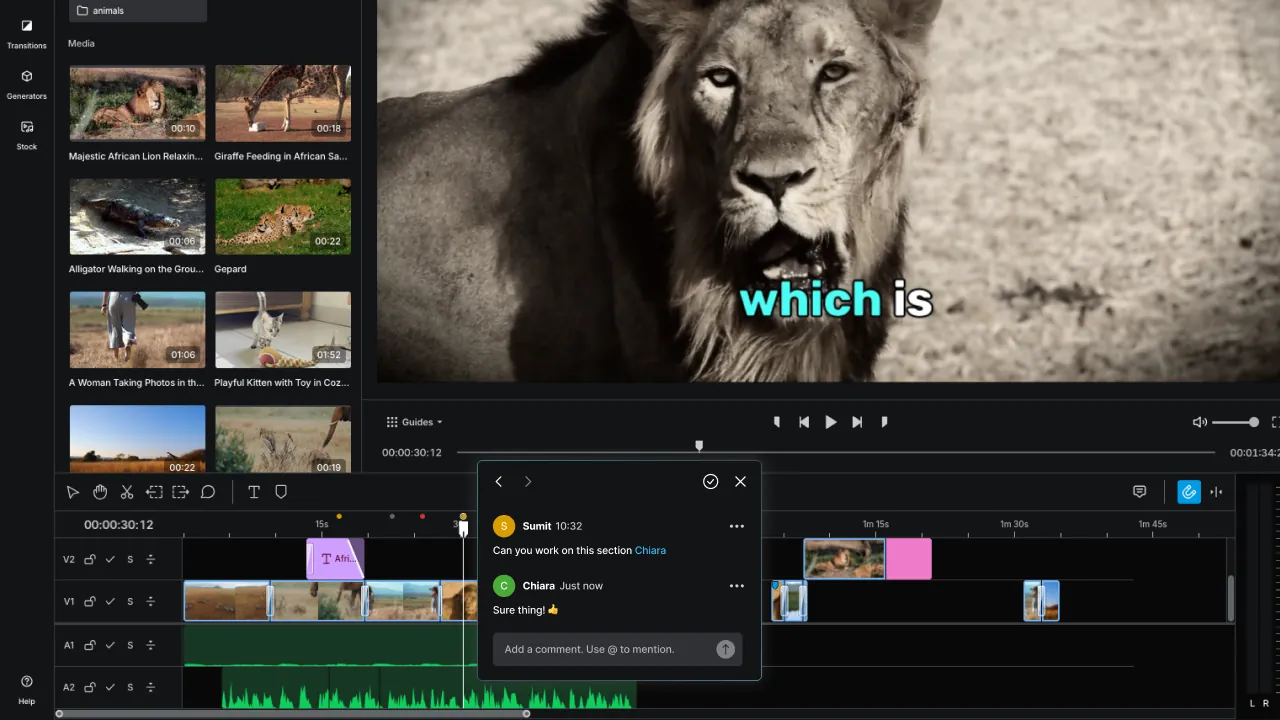
elevate.io is primarily a browser-based video editor, but the review workflow is built into the same project. Editors work on the timeline, and external reviewers get access to a clean player view via Review Mode, where they can watch and leave timestamped comments without touching the edit. Comments land directly on the editing timeline, so the editor sees them immediately without switching tabs or platforms.
The whole project lives under one permanent URL, so stakeholders are always looking at the same version. There's no exporting between rounds and no re-uploading.
Key features: timestamped comments on the editing timeline, Review Mode for external stakeholders, no login required for reviewers, one permanent URL per project, unlimited reviewers on paid plans.
Pricing: A free Starter plan includes unlimited reviewers. Paid plans from $10/month.
Try elevate.io free | See how Review Mode works
Frame.io
Who it's for: professional post-production teams and agencies managing complex multi-stakeholder review across large files.
Frame.io is purpose-built for video review and has deep integrations with Premiere Pro and other professional NLEs. Reviewers can leave frame-accurate comments, draw on the frame, and annotate specific areas. Version control is strong. It's overkill for most marketing teams, and the pricing reflects a professional workflow budget.
Key features: frame-accurate annotations, drawing tools, version stacking, Premiere Pro integration, Camera to Cloud pipeline for high-end production.
Pricing: from $15/user/month (team plans).
Descript
Who it's for: teams producing interview, podcast, or long-form content who use Descript as their primary editor.
Descript has a "Can comment" access role that lets external reviewers leave comments inside the project without editing access. It works within the Descript ecosystem, which is a strength if you're already editing there. If you're not, it adds a tool to your stack.
See how Descript and elevate.io compare
Loom
Who it's for: async feedback on quick-turn content where the review is a short back-and-forth rather than a structured approval workflow.
Loom lets reviewers record and send video responses, and viewers can leave timestamped comments on Loom recordings. It's well suited to lightweight feedback on internal content, not to structured client approval workflows with version tracking.
PlayPause
Who it's for: creative agencies and production teams who need a clean, minimal review tool separate from their editing software.
PlayPause gives reviewers a clean player for leaving timestamped comments. It works as a standalone review tool rather than being integrated into an editor. PlayPause doesn't have a formal sign-off mechanism, so approval is tracked by convention rather than by the tool itself.
Comparison table
Tool | Timestamped comments | Approval workflow | Starting price | Best for |
elevate.io | Yes, on the editing timeline | Commenting and review in the video editor, no formal sign-off | Free | Marketing teams editing and reviewing in one place |
Frame.io | Yes, frame-accurate | Formal sign-off with version tracking, separate from the editor. | $15/user/month | Agency and post-production teams |
Descript | Yes | Commenting within Descript only | Free | Long-form and podcast content |
Loom | Yes | No | Free | Async internal feedback |
PlayPause | Yes | No | Paid | Agencies wanting a standalone review tool |
How to choose
Solo freelancers: Loom or Descript cover most use cases without adding a dedicated tool.
Marketing teams producing branded video: elevate.io's Review Mode covers the review workflow inside the same tool you're editing in. No separate subscription, no link management, no re-uploading.
Large agencies managing formal client deliverables: Frame.io is the strongest option for structured approval tracking, especially if the production team is working in Premiere or Final Cut. The cost is higher, but version control and annotation tools are built for that workflow.
Regulated or compliance-heavy industry: Frame.io or a dedicated approval platform with audit trails. elevate.io and PlayPause don't offer formal sign-off documentation.
If your team is producing branded video and needs clients or stakeholders to review and approve before anything goes live, elevate.io's Review Mode is worth trying. Reviewers watch in a clean player and leave timestamped comments on the timeline. Editors action them in the same workspace. No exports, no re-uploading, no chasing the latest version. Try elevate.io free.
Frequently asked questions
What is video feedback software?
It's a tool that gives clients and stakeholders a dedicated place to leave comments on a video, with comments attached to specific timestamps so editors know exactly what to change. Good tools also track versions, manage access, and keep all reviewers looking at the same file. The best put that feedback inside the video editor itself, so there’s no app or tab switching.
How does video approval software speed up review cycles?
By centralizing feedback in one place and eliminating the export-upload-resend loop. When a reviewer leaves a comment at 0:23 and the editor can action it immediately in the same workspace, a round of revisions that used to take a day takes an hour.
Does video feedback software integrate with Premiere or Final Cut?
Frame.io has the deepest integration with Premiere Pro. Most other tools, including elevate.io, are standalone browser-based workspaces that don't require an NLE integration because the editing happens inside the tool.
Do reviewers need to create an account?
With elevate.io, no. Reviewers access a project via link and can leave comments without signing up. Frame.io has a similar guest access option. Some tools require a free account before a reviewer can comment.
What does video feedback software typically cost?
Free plans exist on most tools in this category, including elevate.io, Loom, and Descript. Paid plans range from $10/month (elevate.io Creator) to $15+ per user per month for Frame.io team plans.
Is there a free option for client video review?
Yes. elevate.io's free Starter plan includes unlimited reviewers, which is one of the few free plans in this category that doesn't limit reviewer access.
Getting feedback on a video should be straightforward. Is it ever though? Your client sends feedback on an email thread, your colleague pings you in Slack, and someone else comments on an export link. Soon, there’s a back-and-forth, and multiple revision rounds. By the end, you’re not even entirely sure which version of the file your client is looking at.
Video feedback software exists to fix that. This guide covers what it does, what separates good tools from poor ones, and provides a comparison of the options worth considering.
What is video feedback software?
Video feedback software gives clients and stakeholders a dedicated place to watch a video and leave comments, without the feedback ending up scattered across email and chat threads.
Good tools attach comments to a specific timestamp in the video, so the editor knows exactly what moment is being discussed. The best tools go a step further: they keep all reviewers looking at the same version, track which feedback has been actioned, and let editors respond without exporting or re-uploading anything between rounds. (See how elevate handles this).
Video approval software refers to tools in the same category, but with an emphasis on documenting sign-off: who approved, on which version, and when.
What to look for
Before evaluating specific products, it's worth knowing which features actually matter:
Timestamped comments. A comment that says "the music is too loud" is hard to action, but a comment pinned to 0:23 on the timeline is not. Timestamped, frame-specific comments are the baseline.
Version control. Teams producing multiple rounds of revisions need to know which version each piece of feedback refers to. Good tools track versions automatically so you don’t end up with files named v1_final_v2_FINAL_CLIENT.
No re-uploading between rounds. The biggest time sink in most video review workflows is the loop that happens when you’re exporting a new cut, uploading it to a review link, and sending the link again. The best tools eliminate this because the editor updates the file and the reviewers see the latest version at the same URL.
Approval tracking. Some teams need documented proof that a video was reviewed and signed off before it went live, especially in regulated industries, agency workflows with formal deliverables, and any team that's ever had a client dispute whether they approved something.
Best video feedback software
elevate.io
Who it's for: marketing teams that want editing and review in the same workspace, without switching tools between rounds.
elevate.io is primarily a browser-based video editor, but the review workflow is built into the same project. Editors work on the timeline, and external reviewers get access to a clean player view via Review Mode, where they can watch and leave timestamped comments without touching the edit. Comments land directly on the editing timeline, so the editor sees them immediately without switching tabs or platforms.
The whole project lives under one permanent URL, so stakeholders are always looking at the same version. There's no exporting between rounds and no re-uploading.
Key features: timestamped comments on the editing timeline, Review Mode for external stakeholders, no login required for reviewers, one permanent URL per project, unlimited reviewers on paid plans.
Pricing: A free Starter plan includes unlimited reviewers. Paid plans from $10/month.
Try elevate.io free | See how Review Mode works
Frame.io
Who it's for: professional post-production teams and agencies managing complex multi-stakeholder review across large files.
Frame.io is purpose-built for video review and has deep integrations with Premiere Pro and other professional NLEs. Reviewers can leave frame-accurate comments, draw on the frame, and annotate specific areas. Version control is strong. It's overkill for most marketing teams, and the pricing reflects a professional workflow budget.
Key features: frame-accurate annotations, drawing tools, version stacking, Premiere Pro integration, Camera to Cloud pipeline for high-end production.
Pricing: from $15/user/month (team plans).
Descript
Who it's for: teams producing interview, podcast, or long-form content who use Descript as their primary editor.
Descript has a "Can comment" access role that lets external reviewers leave comments inside the project without editing access. It works within the Descript ecosystem, which is a strength if you're already editing there. If you're not, it adds a tool to your stack.
See how Descript and elevate.io compare
Loom
Who it's for: async feedback on quick-turn content where the review is a short back-and-forth rather than a structured approval workflow.
Loom lets reviewers record and send video responses, and viewers can leave timestamped comments on Loom recordings. It's well suited to lightweight feedback on internal content, not to structured client approval workflows with version tracking.
PlayPause
Who it's for: creative agencies and production teams who need a clean, minimal review tool separate from their editing software.
PlayPause gives reviewers a clean player for leaving timestamped comments. It works as a standalone review tool rather than being integrated into an editor. PlayPause doesn't have a formal sign-off mechanism, so approval is tracked by convention rather than by the tool itself.
Comparison table
Tool | Timestamped comments | Approval workflow | Starting price | Best for |
elevate.io | Yes, on the editing timeline | Commenting and review in the video editor, no formal sign-off | Free | Marketing teams editing and reviewing in one place |
Frame.io | Yes, frame-accurate | Formal sign-off with version tracking, separate from the editor. | $15/user/month | Agency and post-production teams |
Descript | Yes | Commenting within Descript only | Free | Long-form and podcast content |
Loom | Yes | No | Free | Async internal feedback |
PlayPause | Yes | No | Paid | Agencies wanting a standalone review tool |
How to choose
Solo freelancers: Loom or Descript cover most use cases without adding a dedicated tool.
Marketing teams producing branded video: elevate.io's Review Mode covers the review workflow inside the same tool you're editing in. No separate subscription, no link management, no re-uploading.
Large agencies managing formal client deliverables: Frame.io is the strongest option for structured approval tracking, especially if the production team is working in Premiere or Final Cut. The cost is higher, but version control and annotation tools are built for that workflow.
Regulated or compliance-heavy industry: Frame.io or a dedicated approval platform with audit trails. elevate.io and PlayPause don't offer formal sign-off documentation.
If your team is producing branded video and needs clients or stakeholders to review and approve before anything goes live, elevate.io's Review Mode is worth trying. Reviewers watch in a clean player and leave timestamped comments on the timeline. Editors action them in the same workspace. No exports, no re-uploading, no chasing the latest version. Try elevate.io free.
Frequently asked questions
What is video feedback software?
It's a tool that gives clients and stakeholders a dedicated place to leave comments on a video, with comments attached to specific timestamps so editors know exactly what to change. Good tools also track versions, manage access, and keep all reviewers looking at the same file. The best put that feedback inside the video editor itself, so there’s no app or tab switching.
How does video approval software speed up review cycles?
By centralizing feedback in one place and eliminating the export-upload-resend loop. When a reviewer leaves a comment at 0:23 and the editor can action it immediately in the same workspace, a round of revisions that used to take a day takes an hour.
Does video feedback software integrate with Premiere or Final Cut?
Frame.io has the deepest integration with Premiere Pro. Most other tools, including elevate.io, are standalone browser-based workspaces that don't require an NLE integration because the editing happens inside the tool.
Do reviewers need to create an account?
With elevate.io, no. Reviewers access a project via link and can leave comments without signing up. Frame.io has a similar guest access option. Some tools require a free account before a reviewer can comment.
What does video feedback software typically cost?
Free plans exist on most tools in this category, including elevate.io, Loom, and Descript. Paid plans range from $10/month (elevate.io Creator) to $15+ per user per month for Frame.io team plans.
Is there a free option for client video review?
Yes. elevate.io's free Starter plan includes unlimited reviewers, which is one of the few free plans in this category that doesn't limit reviewer access.